
About Project
MASTER THESIS
Role
User Experience Designer
Duration
6 months
FitCal
Fit + Calibration
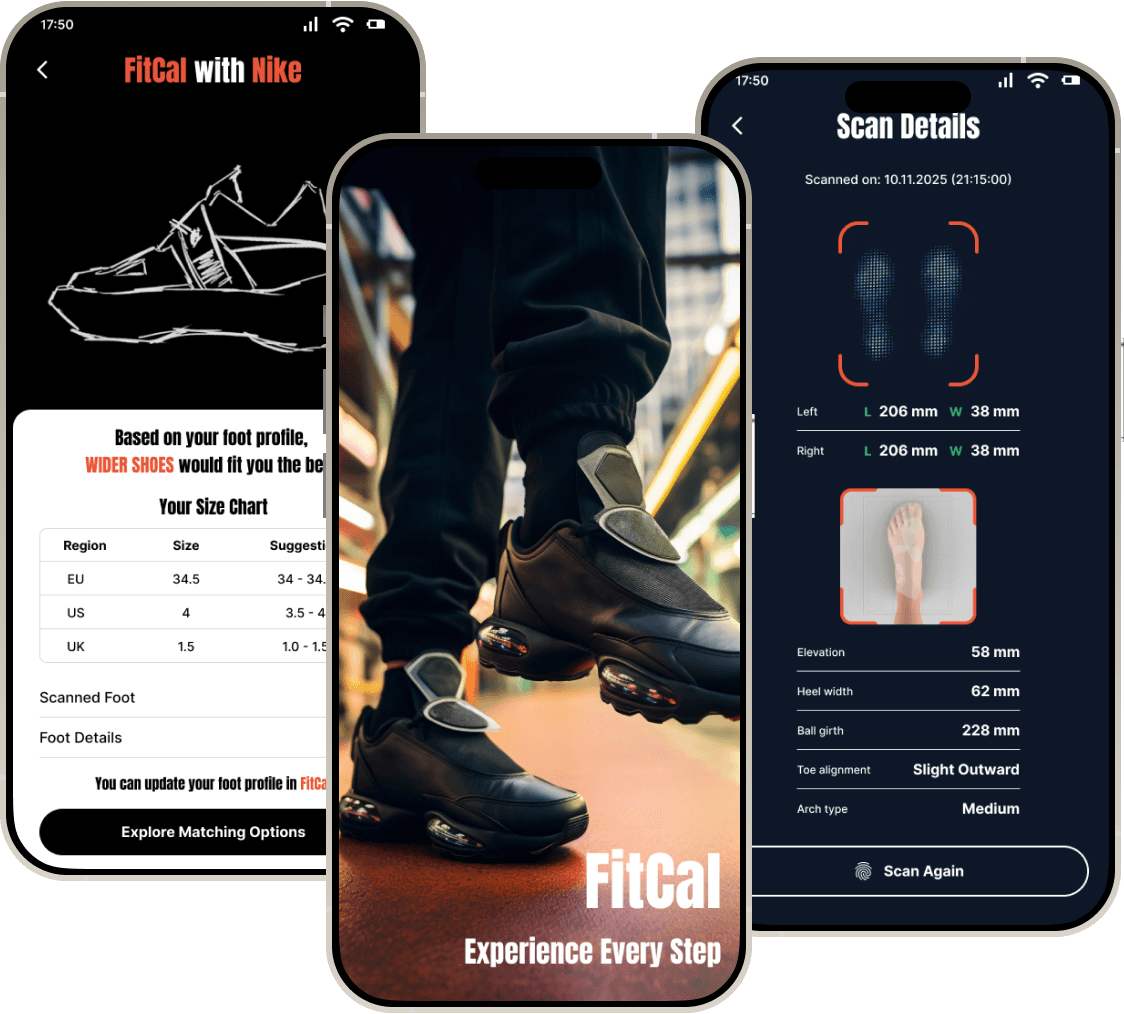
FitCal is an Augmented Reality Smart plugin, designed to enhance online footwear shopping experience. It can be integrated to existing footwear brand applications. It incorporates accurate 3D foot scanning with AR, inclusive fit analysis and AI-driven personalized recommendations based on brands.
Challenge
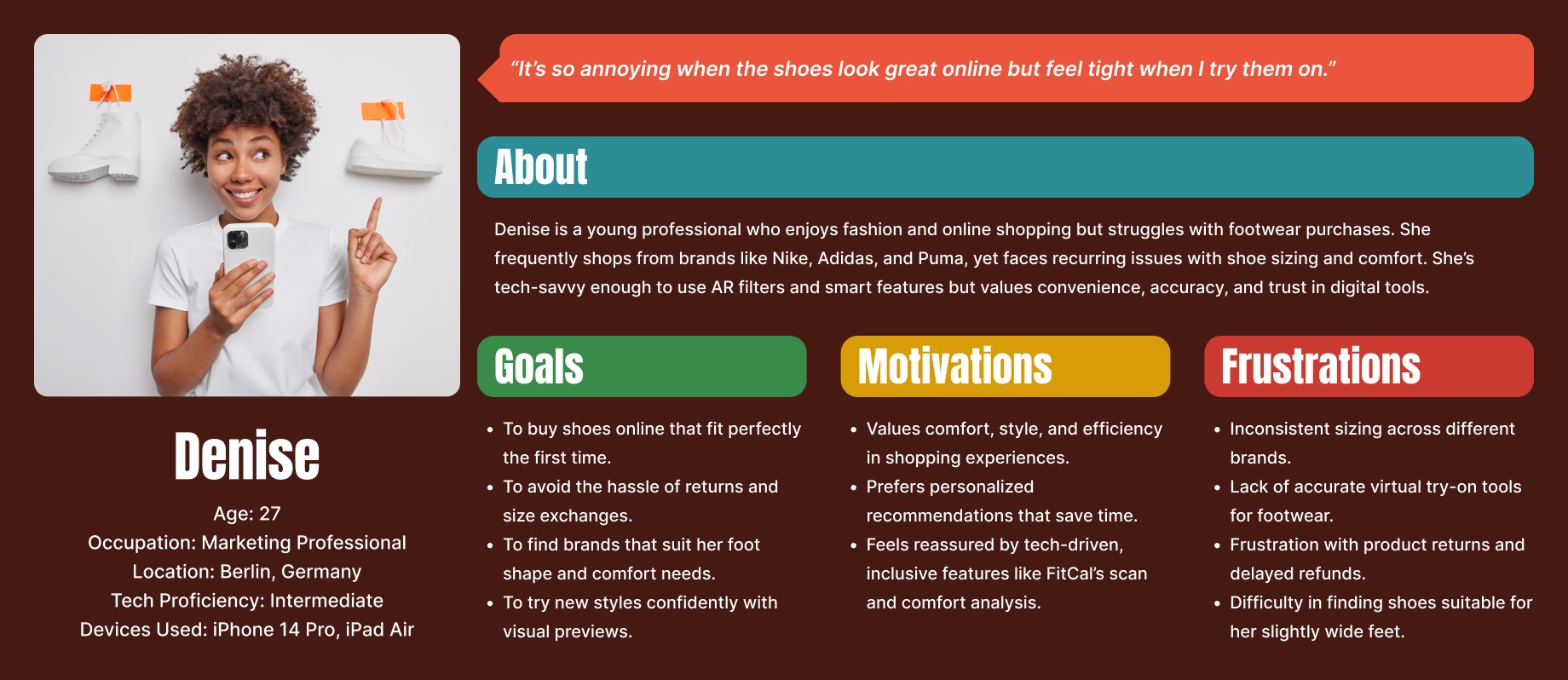
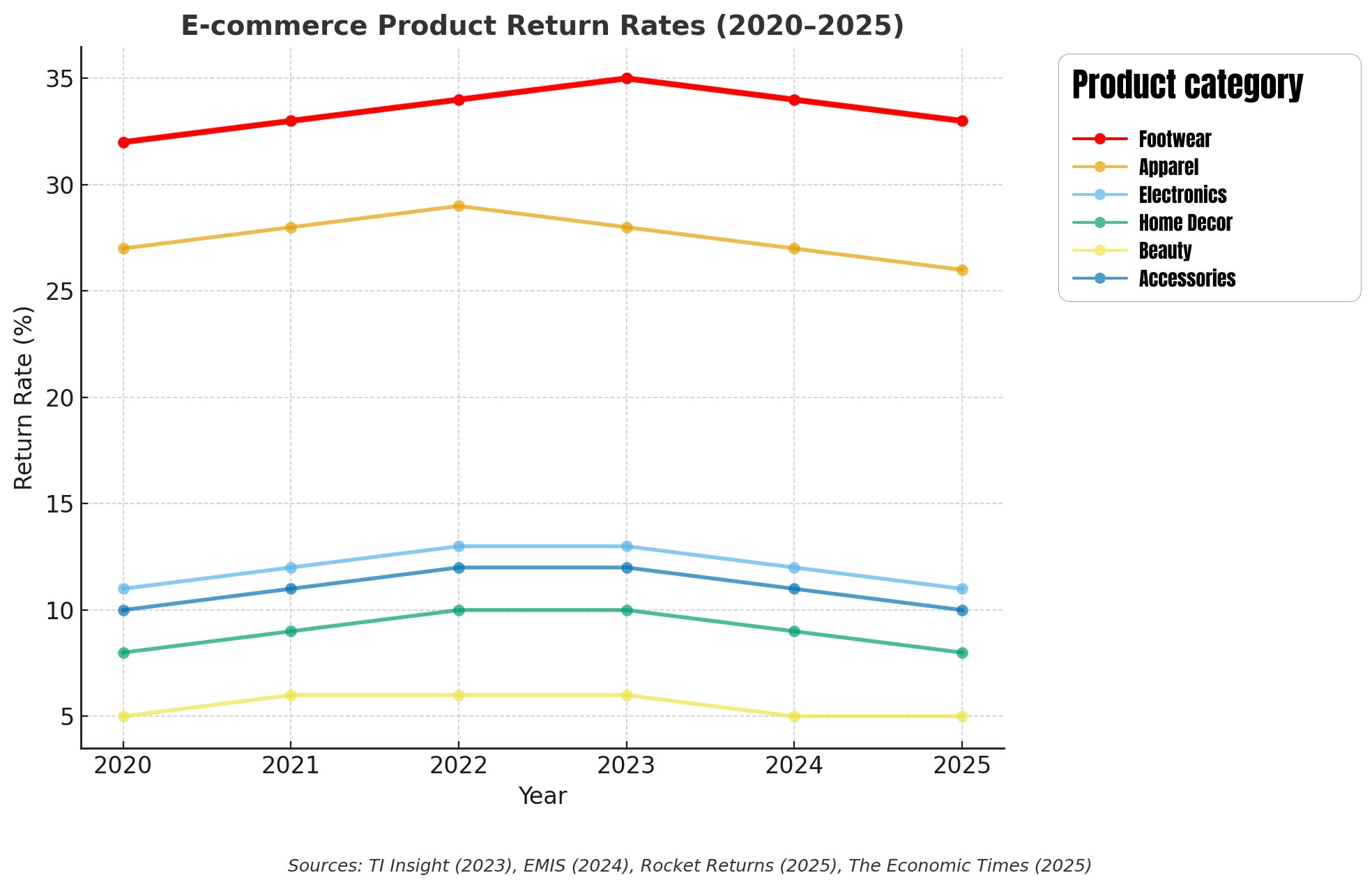
Online footwear shopping lacks tactile and spatial cues for assessing fit, comfort, and appearance. Size inconsistency across brands and absence of inclusivity causes user frustration and high product return rates. The experience leads to wasted time, reduced trust, and lower customer retention.
Solution
FitCal is an AR smart plugin designed for existing footwear brands’ mobile apps. It includes AR foot scanning and device camera calibration for accurate 3D foot measurements and integrates a foot condition quiz for inclusivity. AI analyzes brand-specific sizing data to suggest personalized footwear recommendations. It enhances user trust and reduces returns.

SWOT Analysis
Persona
Market Gap
Brand-Specific Fit Variations
Each footwear brand (e.g., Nike, Adidas, Puma) follows its own sizing chart, causing confusion and inconsistency in fit across online platforms.
High Return Rates
Around 30-40% of online footwear purchases are returned due to size or fit issues, leading to environmental and financial waste.
Limited Inclusivity
Current online footwear systems do not account for user-specific foot conditions such as flat feet, bunions, or high arches, which affect comfort and usability.
Gap between Technology and Usability
Many AR tools lack intuitive UX design and seamless calibration, resulting in low adoption despite technological promise.
Core Technologies
Camera Calibration
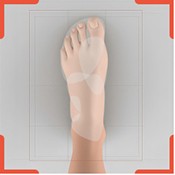
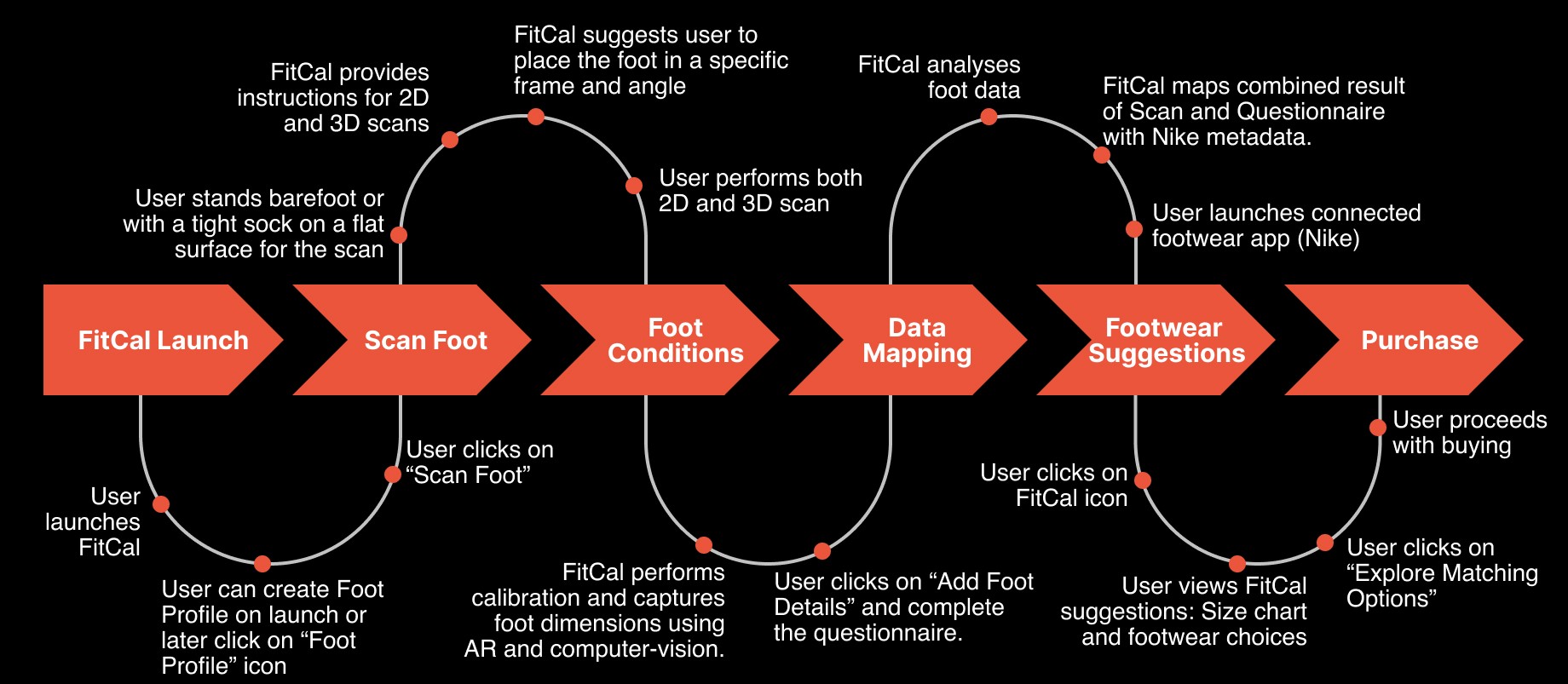
Each smartphone model has unique camera parameters such as focal length, sensor size, and lens distortion. FitCal uses a pre-stored calibration database to identify the device and adjust for these parameters automatically without requiring external hardware or reference markers.
Depth and Spatial Mapping
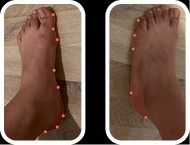
Using AR frameworks such as ARKit (iOS) or ARCore (Android), the system projects depth maps to detect the foot’s outline, contours, and elevation points. The foot’s length, width, and arch height are extracted by aligning depth data with a 3D coordinate system based on the camera’s reference frame.

Foot Data Analysis
AI analyzes extracted foot parameters, such as length, width, and arch height to determine ergonomic classifications (e.g., flat foot, wide foot, narrow arch). It evaluates asymmetry between feet, which is common among users, to suggest adaptive sizing.

Brand-Specific Mapping
Each footwear brand has its own sizing scale.
FitCal’s AI cross-references the user’s measurements with brand-specific fit databases to recommend the most accurate size for that brand.
For example, a user who is size 4 in Nike might be size 3.5 in Adidas, FitCal automatically adjusts for these differences.

Comfort and Inclusivity Factor
The AI factors in user questionnaire data, such as foot pain, arch type, or activity level collected during the quiz. A machine learning model predicts the best shoe type and comfort level for the user.
For example, if the user has a flat arch and reports heel discomfort, the AI suggests cushioned, arch-support shoes with a flexible sole.

Continuous Learning
FitCal’s recommendation engine improves over time through reinforcement learning, using user feedback and return data to refine future predictions. The more users interact with FitCal, the more accurate and personalized its recommendations become.
Integrating FitCal to Apps
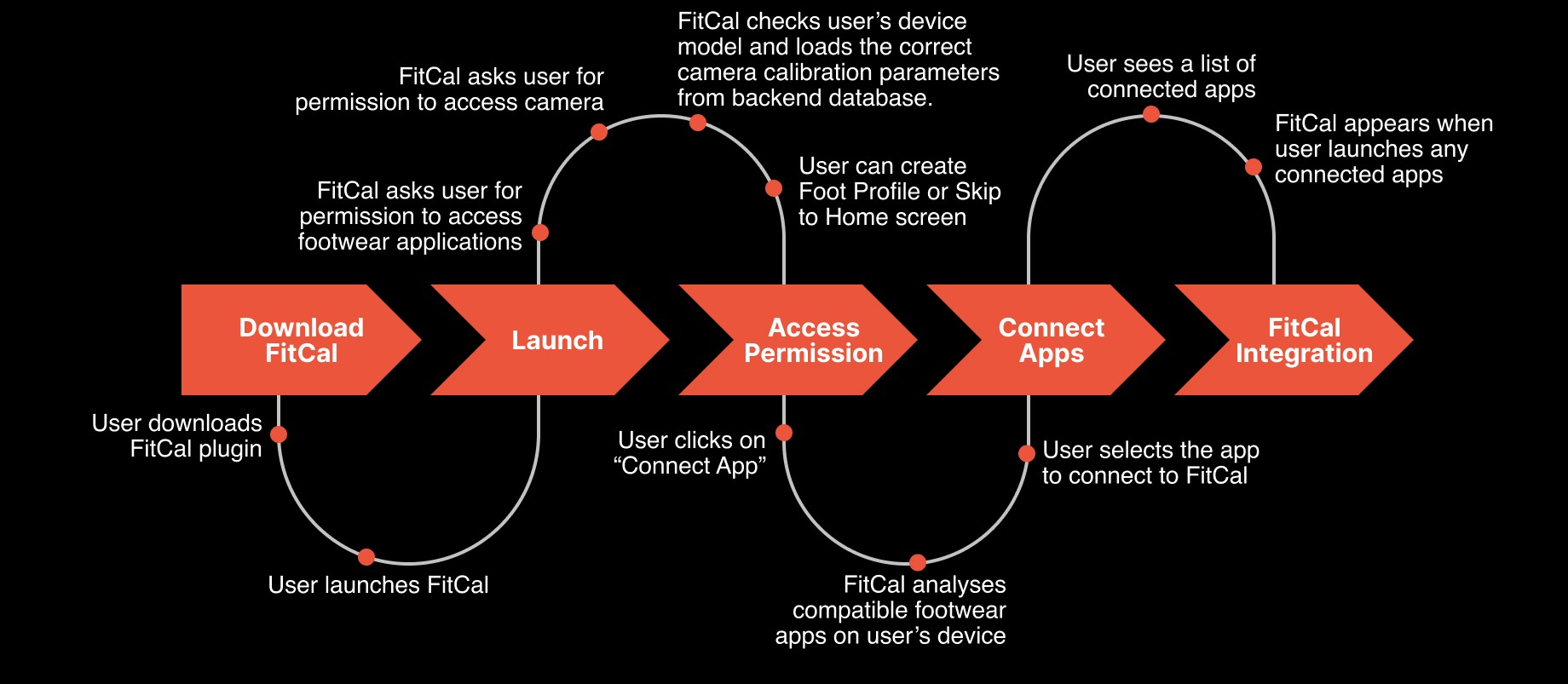
How FitCal works?
Ethical Considerations
Data Privacy
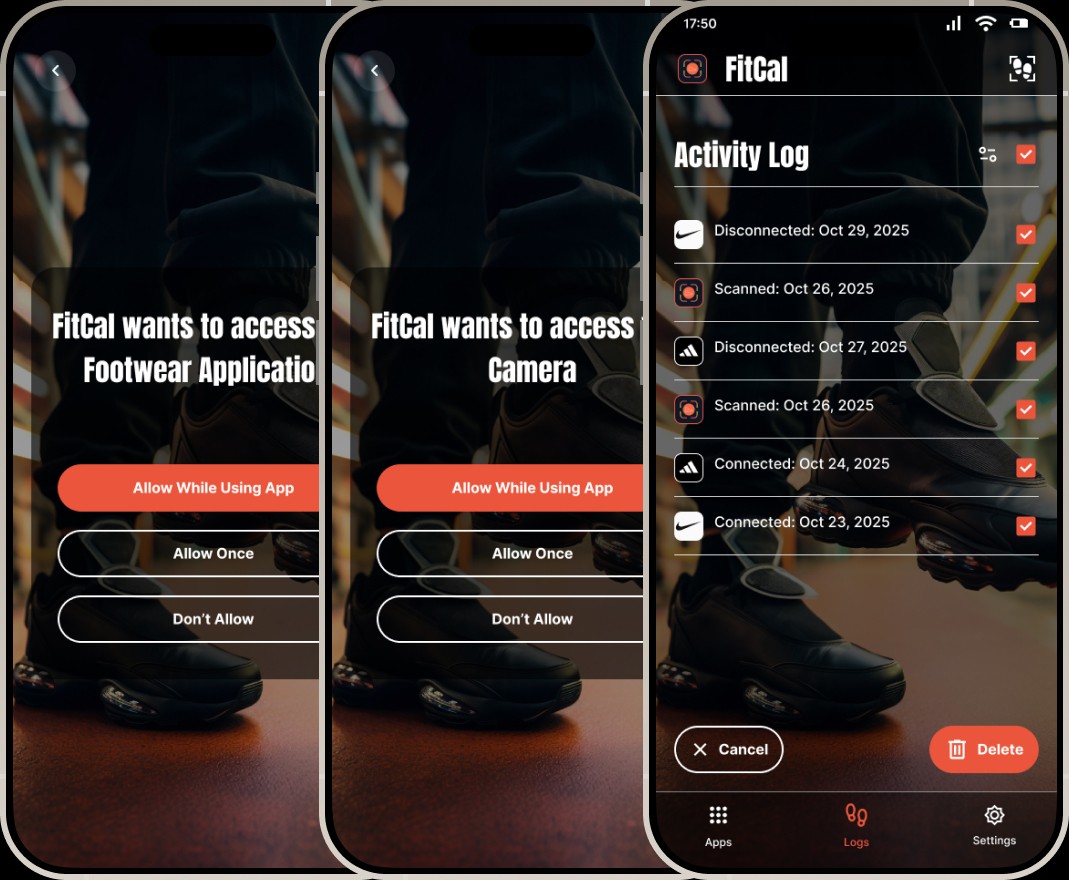
FitCal uses encrypted storage and limits data collection by accessing only the data which is necessary. No facial or identifying biometric information is captured.
Informed Consent
FitCal provides transparent and comprehensive information on what data will be collected, how it will inform suggestions, and how it remains protected.
Algorithmic Fairness
Results are derived purely by mapping foot data with brand-specific sizing data rather than demographic assumptions.
User Control
FitCal limits camera usage strictly to the scanning context and ensures no background tracking occurs. Users retain full control over whether to give access, store, or delete data.
Limitations
Device calibration variability
Accuracy may get affected due to camera resolutions across smartphone, inconsistent depth-sensing capabilities and absence of LiDAR sensors in many mid-range Android devices.
Dependency on brand metadata
AI engine requires access to detailed and structured size metadata from footwear brands. If a brand provides incomplete or outdated sizing data, the suggestion may not be precise.
Limited biomechanical assessment
FitCal does not capture dynamic factors such as pressure distribution while walking and gait patterns. The AI operates strictly based on user input and scan results, learning continuously from foot profiles and user choices.
Mobile and Tablet-only platform
FitCal operates exclusively on mobile phones and tablets due to their integrated camera systems and motion sensors, which are essential for accurate AR scanning.
Foot Profile
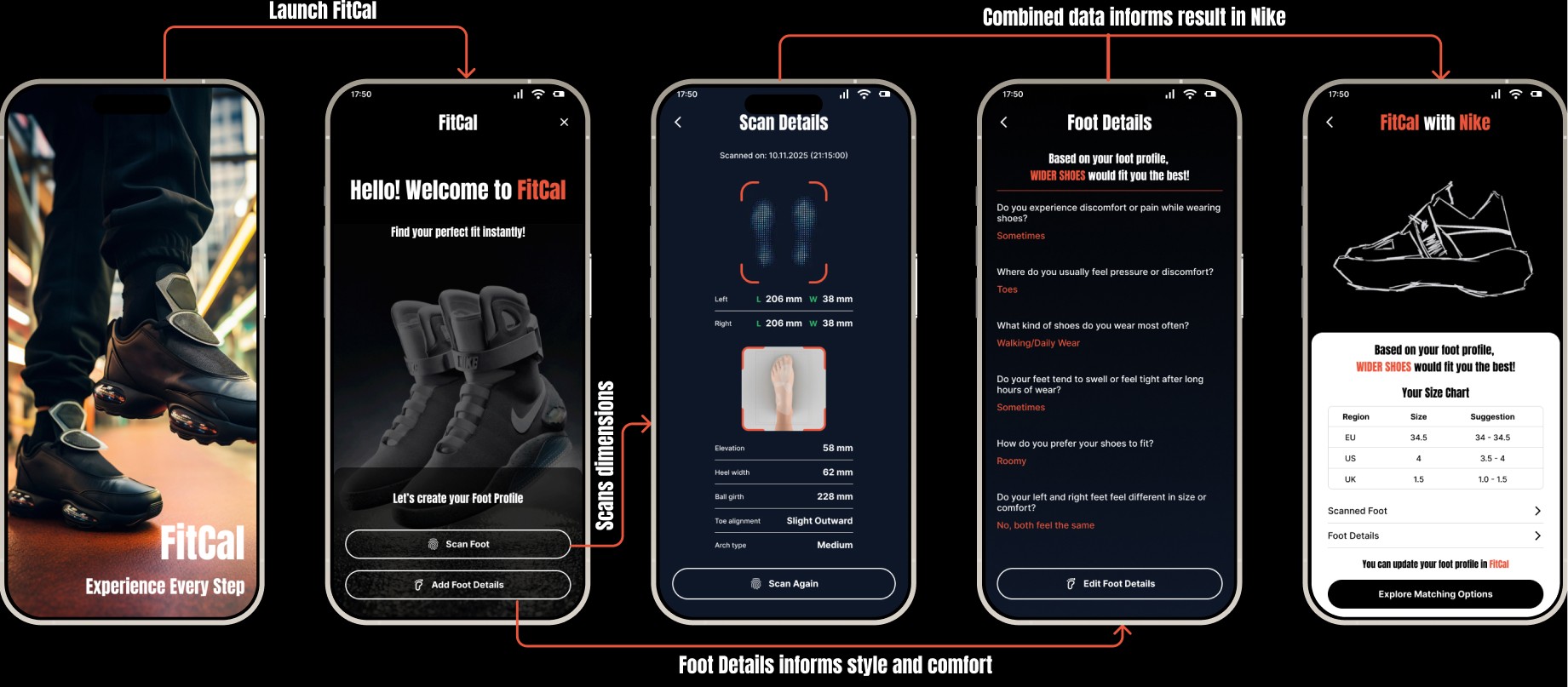
Step 1: Scan Foot
Foot Profile
Step 2: Add Foot Details
Connect FitCal to Nike
FitCal Suggestions in Nike
Testing Goals
The primary objectives of this usability test were:
· To assess how easily users can navigate the FitCal plugin.
· To evaluate whether AR scanning instructions are clear and actionable.
· To measure user understanding and trust in the calculated foot measurements.
· To test whether users find the foot-condition quiz helpful or confusing.
· To identify friction points that may hinder the user journey.
· To gather qualitative feedback for improving UX clarity.
Tasks for participants
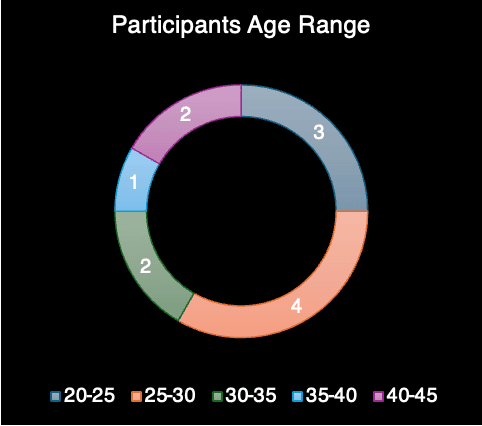
Participants completed the following 8 structured tasks:
1. Open FitCal plugin and follow instructions.
2. Create a “Foot Profile” on FitCal.
3. Select Scan Foot, follow on-screen instructions to position the foot correctly and attempt to complete the AR scan.
4. View measurement results.
5. Complete the Foot Details questionnaire and complete the Foot Profile.
6. Connect FitCal to footwear applications installed in the device.
7. Open any connected app, locate the FitCal button and view final footwear recommendations based on Foot Profile.
8. Explore the matching footwear options or select a footwear and find the FitCal suggestions in the product detail screen.
Qualitative Metrics
Collected through observations and user comments:
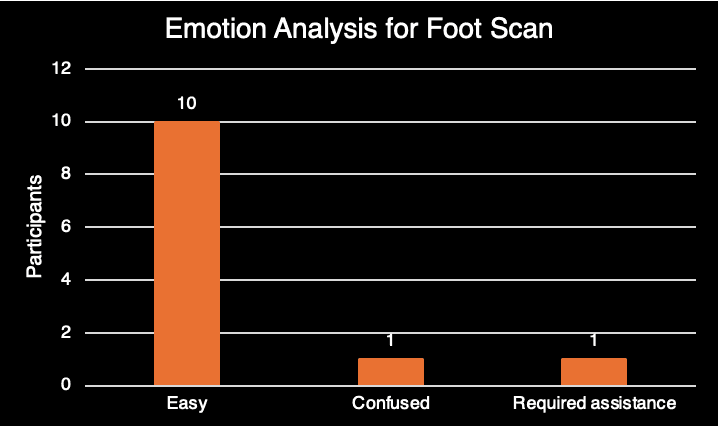
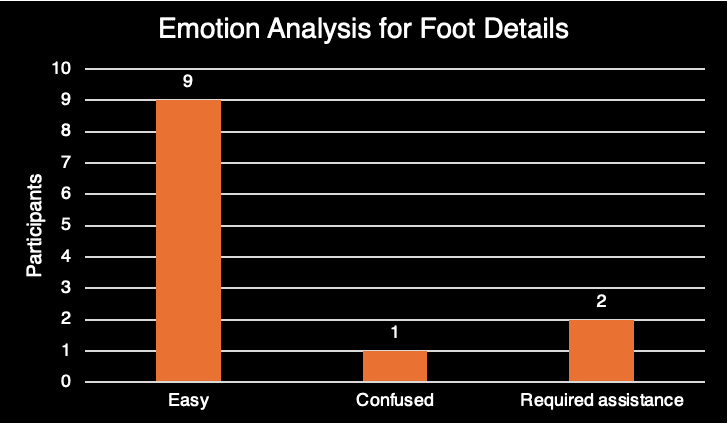
· Emotional response (ease, trust, confusion)
· Perceived usefulness of measurement data and recommendations
· Perceived accuracy of scanning
· Feedback on design clarity and words
Quantitative Metrics
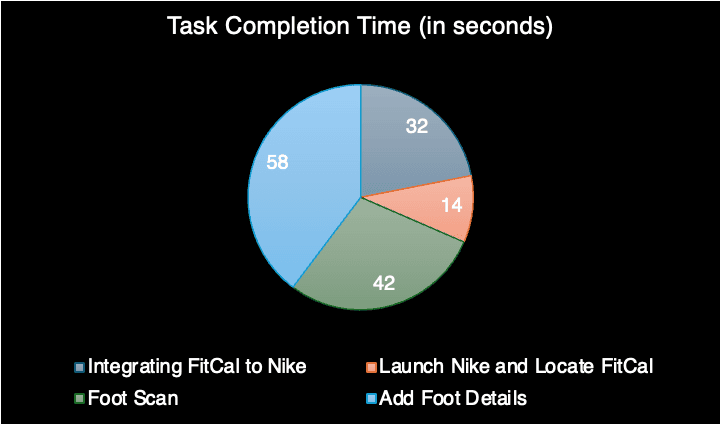
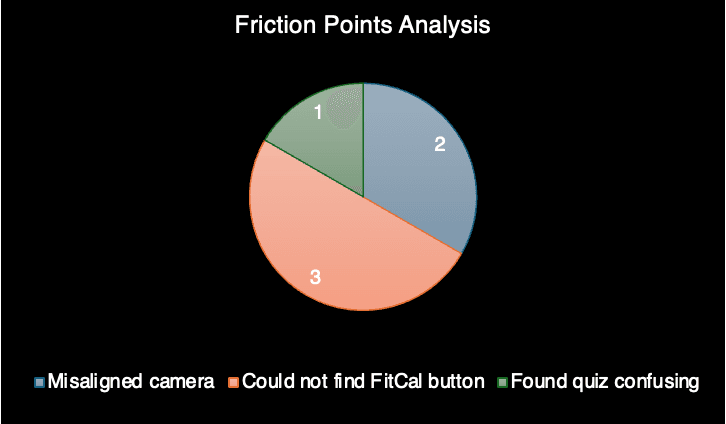
Post-test questions
· What was your favorite aspect of the product?
· What was the most confusing part of the journey?
· Do you think the product is useful?
· Would you recommend this product to a friend or colleague?
Findings
What Worked Well?
· Users appreciated the minimalist design approach.
· The scanning instructions were clear and scanning frame helped users understand the movement needed.
· Users found the 3D foot visualization “engaging,” and “clear.”
· Measurement details were perceived as “accurate”.
· The combination of scan and quiz made recommendations feel “personalized.”
Pain Points
· A few users wanted a “scan confidence score” or explanation of accuracy.
· A few users would appreciate more information on the questionnaire of Foot Details through images.
· A few users wanted to navigate to integrated apps like Nike, directly from FitCal interface.
user Quotes
· The instructions were clear, and it was quite easy to navigate.”
· “It would be even easier for me to open the integrated app directly from the FitCal interface.”
· “The measurements surprised me; I didn’t know my arch height mattered.”
· “Size recommendation feels accurate, but I would like to see how confident it is.”
Results
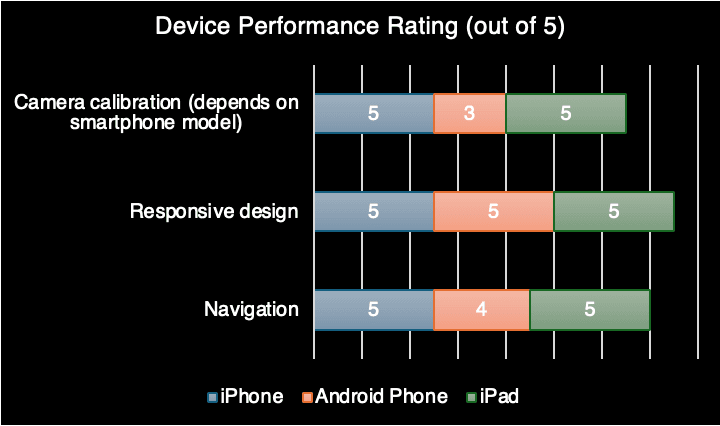
· The FitCal usability testing showed high overall performance across functionality, design and navigation.
· The participants could perform all the core tasks like scanning their feet, review measurements, filling out the foot details questionnaire, and exploring matching footwear options in the integrated app.
· Minor content clarity and visual guidance enhancements were found and can be further used to improve usability of the product in future versions.
· The mean time spent on tasks completion was within acceptable range, which means that there was an efficient flow of tasks.
· Collectively, the findings suggest that FitCal provides a trustworthy shopping experience, enhances the confidence of users, and successfully manages the main areas of concern involved in digital user journey.
Achievements
Selected for Design Commit, International Conference on Design and Industry in Portugal
Recognized for its design-led approach toward sustainable development
Demonstrates how AR and AI-driven fit intelligence can reduce footwear return rates
Contributes to more sustainable e-commerce by minimizing waste, logistics, and overproduction


Scaling partnerships
The immediate next step is to partner with major footwear brands, such as Nike, Adidas, Puma, and Skechers to embed FitCal directly into their mobile applications.
It includes building standardized APIs for rapid onboarding and developing a universal sizing compatibility layer across brands.
Technical precision
The next iteration will focus on optimizing depth detection for non-LiDAR devices and incorporating advanced computer vision algorithms that can self-correct scanning errors.